Real-Time 3D Process Simulation & Design
Design, simulate, and optimize your workflows in an interactive 3D browser environment. Historically locked behind expensive enterprise software and specialized degrees, Centerforge democratizes advanced process tools. Whether modeling a machine shop, a pizza restaurant, or an emergency room, you can map worker pathfinding, scrub through time-travel diagnostics, and run heuristic sweeps to eliminate bottlenecks before they happen.
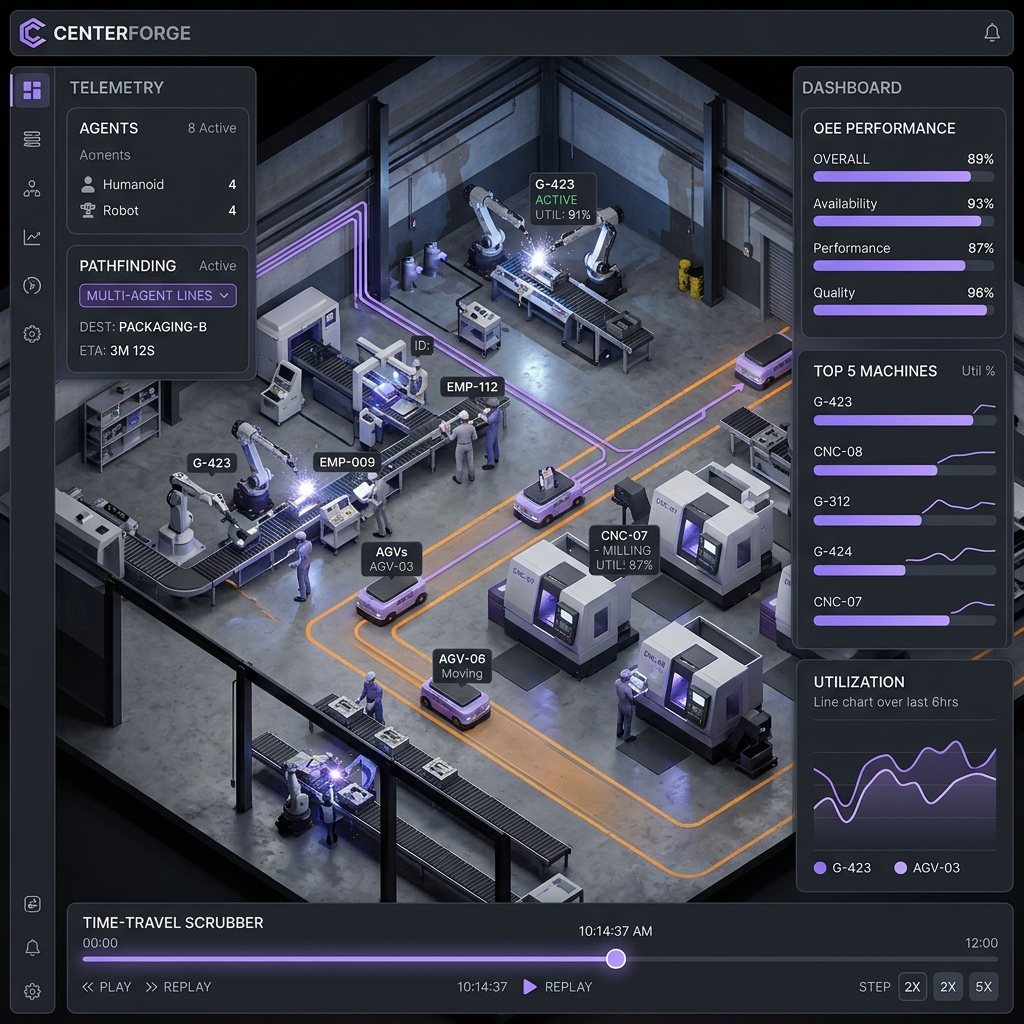
Built for process engineers, service operations, and planners
From multi-agent labor scheduling to real-time process telemetry dashboards, Centerforge combines high-fidelity Three.js visualizations with powerful backend optimization engines to bring your workflow digital twin to life.
🤖 Multi-Agent Pathfinding
Humanoid workers and AGVs navigate your custom layout dynamically using state-of-the-art A* grid paths, handling collisions, custom speed profiles, and starvation states.
📈 Process & Utilization Analytics
View real-time station states (Running, Idle, Starved, Blocked, Blocked-Down). Track overall process effectiveness (OPE) and identify bottlenecks in a unified dark-charcoal dashboard.
⏱️ Time-Travel HUD
Scrub, pause, rewind, and fast-forward your simulation. Run layout experiments risk-free, compare branching timelines, and witness labor sweeps in real-time.
📅 Shift & Labor Scheduling
Define complex labor rules, worker certification matrices, shift rotations, break schedules, and fatigue coefficients to see how labor availability impacts machine throughput.
⚡ Heuristic Optimization Sweeps
Run headless labor and scheduling simulations in under 100ms. Find the optimal number of workers, routes, and station setups to maximize process throughput and yield.
🔌 OPC-UA IoT Bridge
Stream bi-directional physical machine telemetry via standard OPC-UA WebSocket protocols, with graceful mock gateway fallbacks for testing and sandboxed staging.
📐 Floorplan Blueprint Export
Instantly export clean, scale-accurate 2D/3D visual blueprints (SVG, PNG, or PDF format) directly from your simulation layout to share with operators, contractors, and machinery installers.
🔀 Visual Flowchart Schematics
Map and export operational process flows as visual node-link flowchart diagrams, illustrating product routing paths, conveyor queues, splitters, and labor dispatch rules.
⛑️ Automated OSHA Safety Audits
Run automatic 3D compliance scans to instantly flag egress aisle clearance violations, fire extinguisher blocking, equipment collisions, and high-fatigue labor scheduling rules.
Simple, transparent pricing
Start free. Upgrade when you need more power.
- Unlimited 3D simulator editor
- Three.js 2D/3D floorplan builders
- Standard A* worker paths
- Time-Travel timeline scrubbing
- 5 free daily AI generations
- 5-min AI prompt pacing cooldown
- 150 priority credits package
- Bypass all daily limits & pacing
- Priority optimization queue speeds
- 1 credit per single AI object
- 3 credits per oneshot layout
- 500 priority credits package
- Bypass all daily limits & pacing
- Priority optimization queue speeds
- 1 credit per single AI object
- 3 credits per oneshot layout
- 1,500 priority credits package
- Bypass all daily limits & pacing
- Priority optimization queue speeds
- 1 credit per single AI object
- 3 credits per oneshot layout
Capacity gates and active layout counts enforce plan limits dynamically inside the simulator.
Frequently Asked Questions
Do I need complex simulation or coding experience?
No. Historically, process simulation tools have been out of reach for small businesses due to steep pricing and complex coding requirements. Centerforge democratizes these tools with a drag-and-drop 3D builder and pre-configured equipment libraries that make it simple to model your process layout entirely through a visual dashboard, without writing any code.
How do the blueprint, flowchart, and safety reporting tools help my business?
Historically, layout designs, process flowcharts, and safety audits required three separate expensive software packages and constant manual translation. Centerforge compiles them all in one visual dashboard. You can validate your process in 3D, instantly export scale-accurate 2D blueprints (SVG/PNG/PDF) for installer crews, generate process flowcharts for operations manuals, and run automated safety compliance audits in one click. This saves thousands in coordination, drafting, and regulatory overhead.
Can I control simulation variables in real-time?
Yes. Use our timeline scrub controls to pause, rewind, or speed up the simulation. You can click on any worker, AGV, or machine to dynamically modify throughput rates, change shift schedules, or adjust path routing rules on the fly.
Can I connect Centerforge to physical hardware or telemetry?
Absolutely. Pro and Team plans feature our bi-directional IoT Bridge. This allows you to stream live sensor and telemetry data from your physical counters, controllers, or scanners straight into your 3D digital twin, reflecting real-world bottleneck states.
What is the Time-Travel diagnostics feature?
Our Time-Travel HUD keeps a complete historical state log of your process layout. When a bottleneck occurs, you can rewind the simulation, view individual worker fatigue trends, isolate the precise starves or blocks, and test a resolved layout.
Can I run simulation sweeps headlessly?
Yes. With the Pro and Team plans, you can run heuristic layout sweeps in our cloud. This runs hundreds of simulation iterations headlessly in milliseconds, outputting the mathematically optimal placement of stations and workers.
How do the automated compliance and OSHA scans work?
Centerforge includes a built-in safety audit engine. By checking standard regulatory and operational rules (egress aisle widths, clearance bounds around stations, fire extinguisher spacing limits, and labor fatigue factors), it highlights warning hotspots on your 3D floor layout so you can address safety risks before physical installation.
Can I share layout designs directly with contractors or suppliers?
Yes. With our Floorplan Blueprint Export, you can export scale-accurate 2D schematics in vector SVG, high-resolution PNG, or PDF formats. This makes it incredibly easy to deliver verified, professional layouts directly to architects, contractors, or machinery suppliers without needing separate CAD drafting suites.